
Pages Built to Rank and Get Clicked.
On-page SEO is everything on the page itself that decides whether Google ranks it: the title, the headings, the words, the URL, the images, the internal links and the code behind them. I optimize them on whatever platform you use, from WordPress and Shopify to Wix, Squarespace and Webflow.
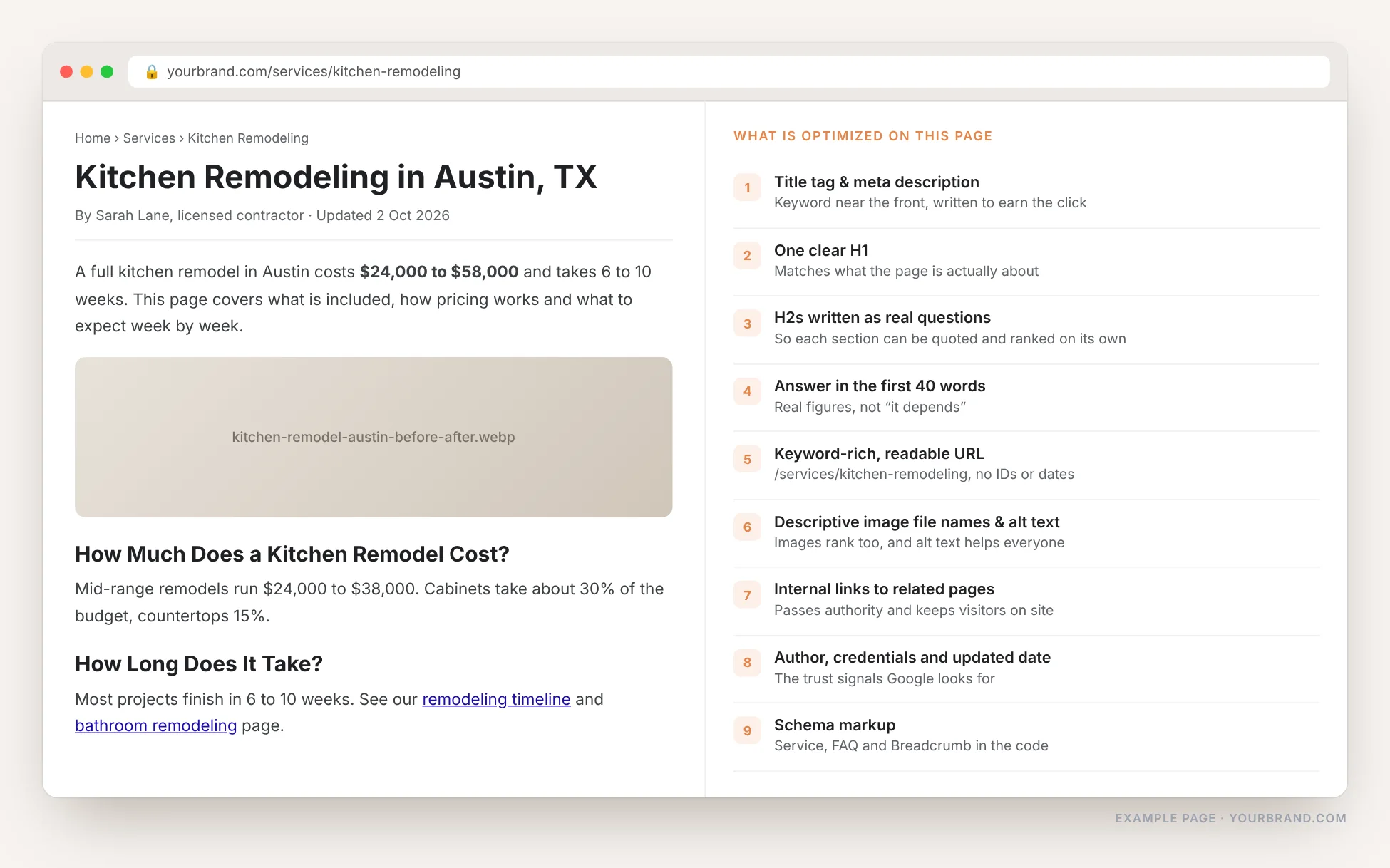
Why On-Page SEO Is Important
It is the only part of SEO you fully control. You cannot make other websites link to you and you cannot change Google’s algorithm, but every word, tag and link on your own pages is yours to fix, today.
Google has to understand the page first
Before a page can rank, Google has to work out what it is about. Titles, headings and clear wording do that job. A page with a vague title and no structure gets ranked for nothing in particular.
Rankings alone do not bring visits
Two pages in the same position can get very different traffic. The title and description decide who clicks. A clear, specific snippet can multiply clicks without moving a single position.
It is the cheapest SEO work there is
Link building takes months and money. Rewriting a title, fixing an H1 or adding internal links takes an afternoon and starts working at the next crawl.
AI answers quote well-structured pages
ChatGPT and Google AI Overviews pull short passages out of pages. A clear heading with the answer right under it is what gets quoted. Messy pages get skipped.
Link building is wasted without it
Links point authority at a page. If that page has no clear topic, no headings and a weak title, the authority lands on something Google cannot classify.
The same work helps visitors
Clear headings, real answers, fast-loading images and sensible links make the page easier to read. Better reading means longer visits and more enquiries.
Same Page, Same Site, Different Snippet
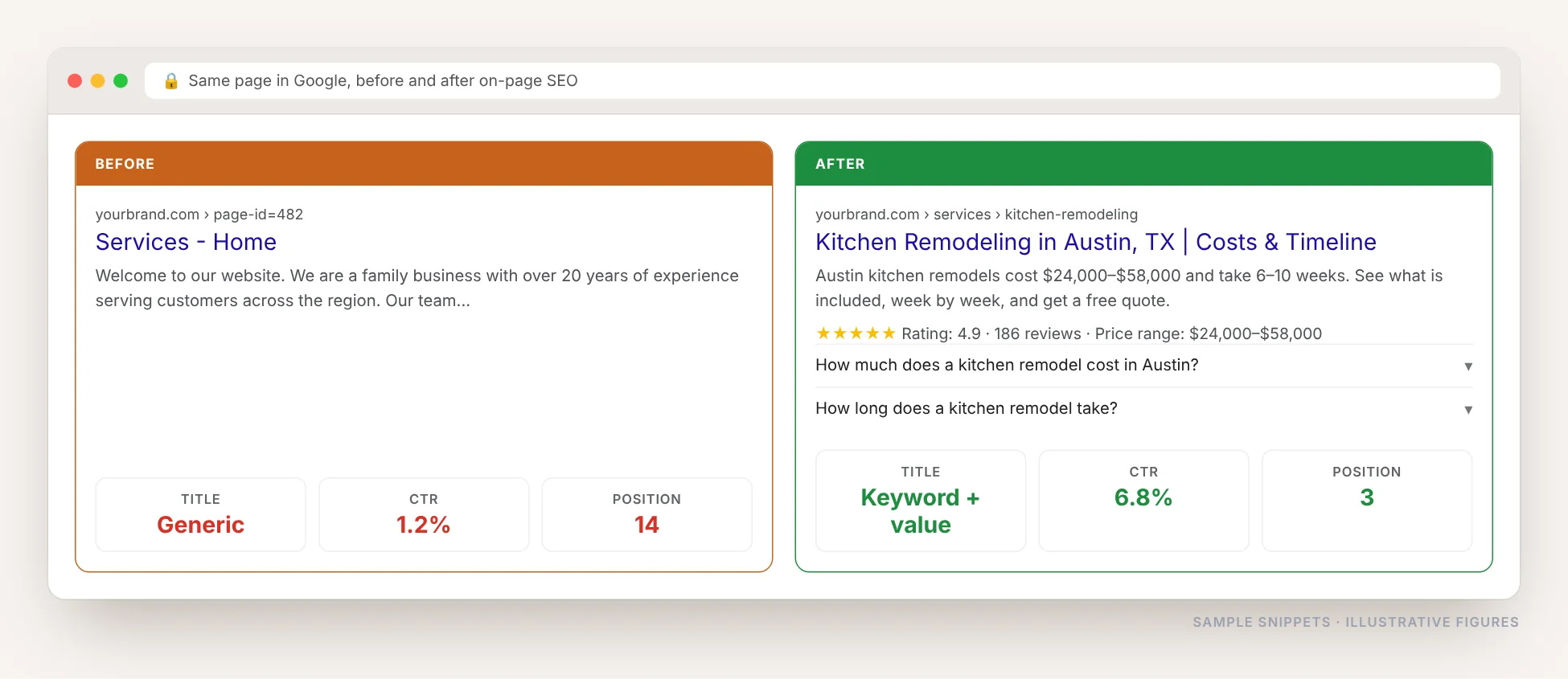
This is one page before and after on-page work. Nothing was added to the website, no new links were built. The title was rewritten around what people search, the URL was cleaned, the content answered the question in the first lines, and FAQ schema was added.
- Title rewritten with the keyword and a reason to click
- URL changed from an ID to real words
- Price and timeline put in the first sentence
- FAQ and Review schema added, so the snippet grew
On-Page SEO in WordPress
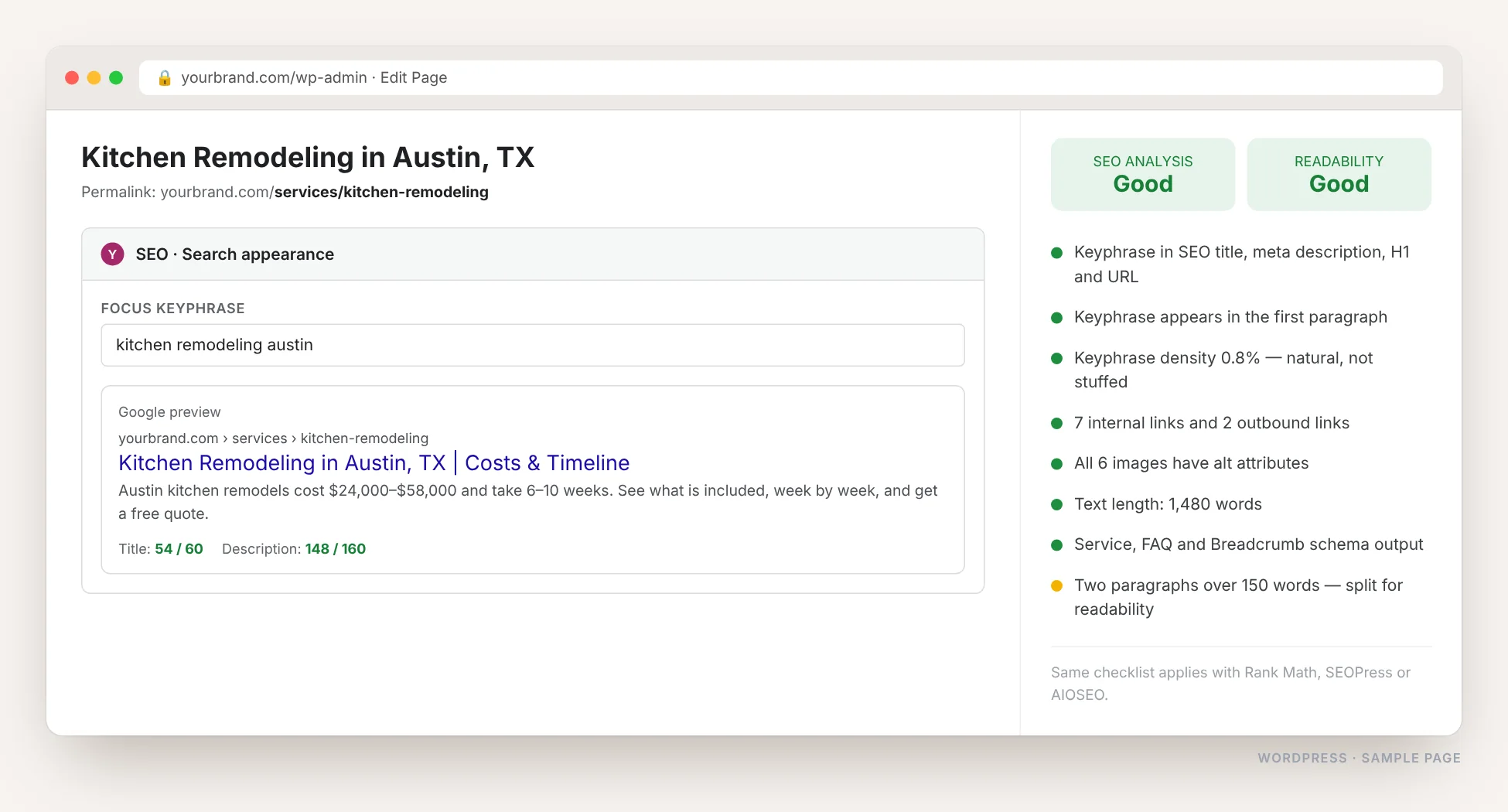
WordPress gives you the most control of any platform, through Yoast, Rank Math, SEOPress or AIOSEO. I set the focus keyword, write the title and meta description, fix the permalink, structure the headings, add alt text and output the right schema, then work the checklist until every light is green for a real reason, not just to please the plugin.
On-Page SEO in Shopify
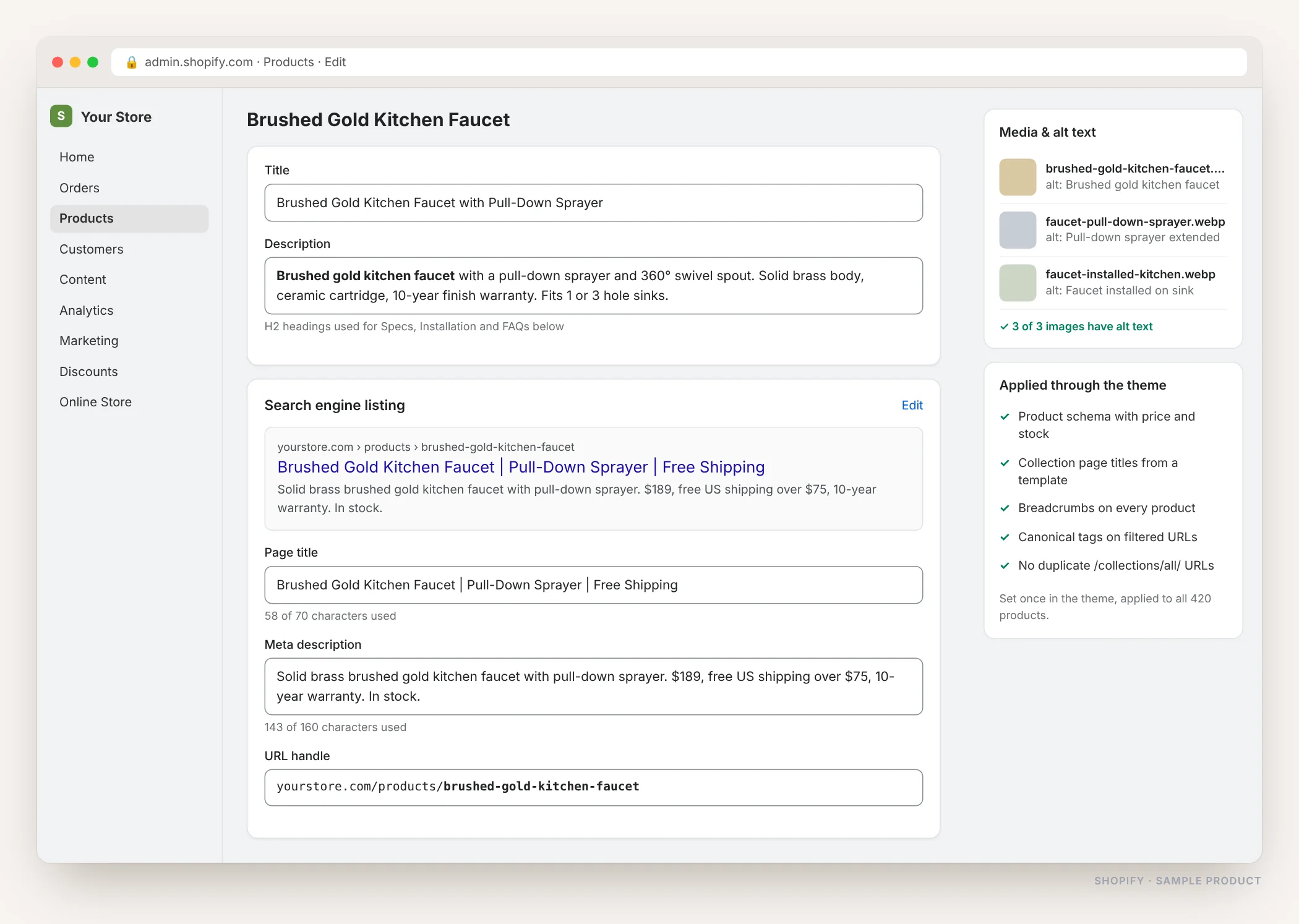
Shopify hides most SEO work in the “Search engine listing” box at the bottom of each product. I write the page title, meta description and URL handle for every important product and collection, add alt text to the images, and set the rest in the theme so hundreds of products are covered at once.
And Every Other Platform
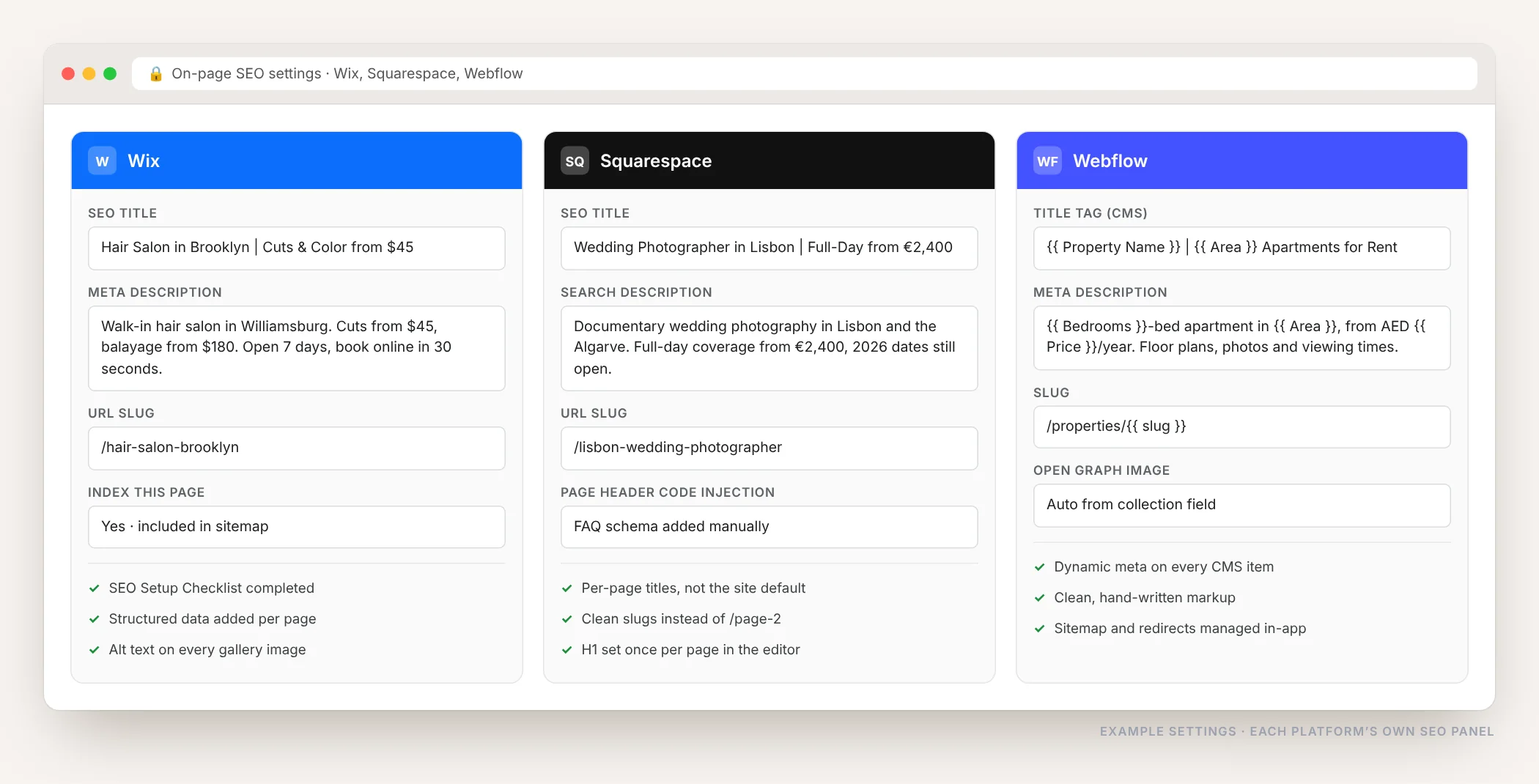
Every CMS has its own SEO panel, its own wording and its own limits. The work is the same: one clear title, a description that earns the click, a readable URL, alt text and schema. I know where those settings live on each platform and how to work around what it will not let you change.
WordPress
Yoast, Rank Math or SEOPress set up properly, and templates fixed so every new post starts optimized.
Shopify
Product and collection titles, meta descriptions, handles, alt text and product schema, applied through templates.
Wix
SEO title and description per page, URL slugs, the SEO Setup Checklist, structured data and index settings.
Squarespace
Page titles and search descriptions written individually instead of the defaults, slugs cleaned, schema injected in the header.
Webflow
Dynamic title and meta fields on CMS collections, so every new item publishes with its own optimized tags.
Any other platform
WooCommerce, Blogger, Framer, Laravel, React or a custom build. If the page has a head tag, the same work applies.
Nothing Is Called Done Until a Tool Agrees
Writing a good title is not proof that the page is fixed. I crawl the whole site first, so every missing title, empty meta description, duplicate H1 and image without alt text is listed, then crawl it again afterwards to confirm the list is empty.
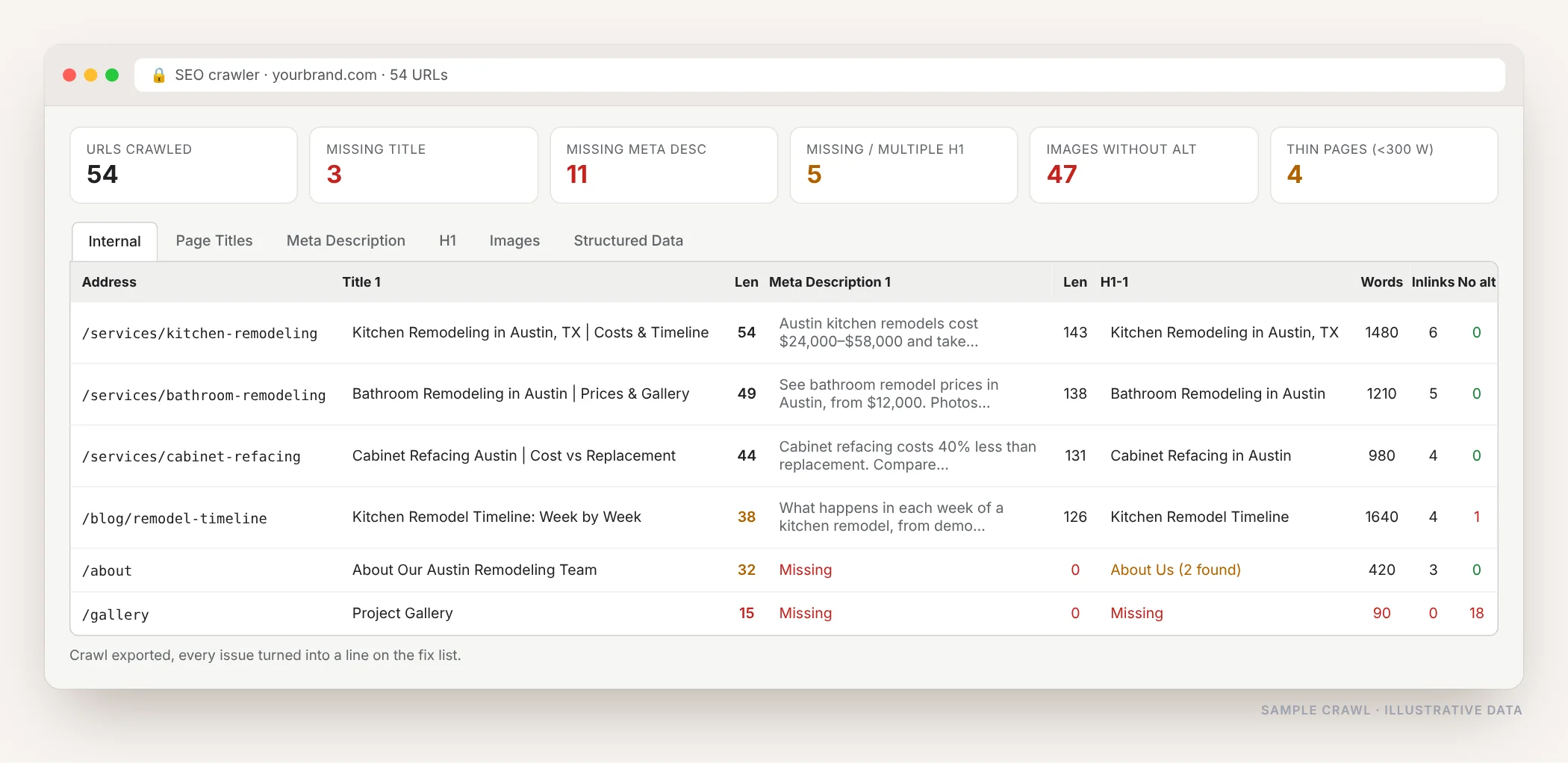
Then each page is checked individually: schema validated in the Rich Results Test, speed and Core Web Vitals in PageSpeed Insights, and the actual result in your own Search Console once Google recrawls.
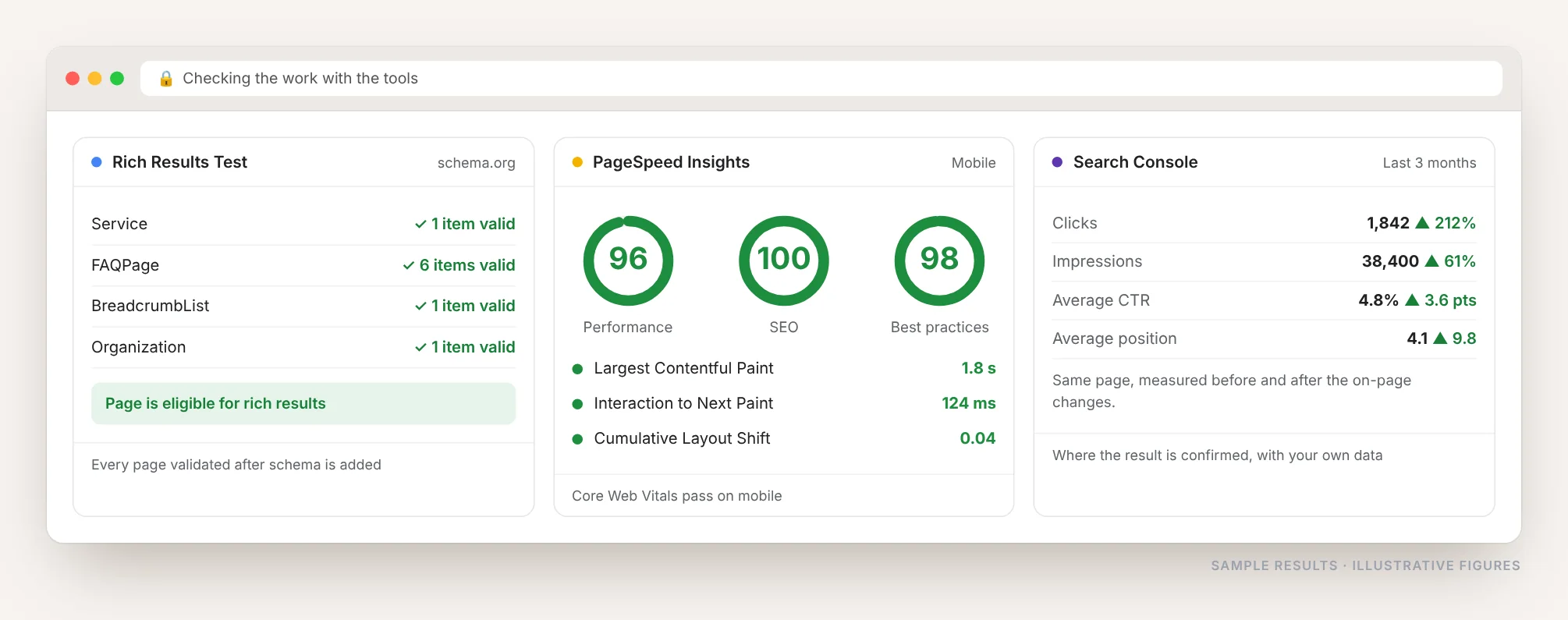
Site crawler
Screaming Frog or Sitebulb to list every missing title, meta description, H1 and alt attribute across the whole site.
Google Search Console
The only source that shows real clicks, impressions, CTR and position for each page, before and after.
Rich Results Test
Every piece of schema validated by Google itself, so the markup is actually eligible for rich results.
PageSpeed Insights
Core Web Vitals on mobile first, since speed is part of on-page and affects both rankings and enquiries.
Ahrefs or Semrush
Keyword research per page, plus on-page checks and ranking tracking for the keywords that matter.
The SEO plugin itself
Yoast or Rank Math as a last pass, used as a checklist rather than a score to chase.
What On-Page SEO Covers
- Title tag: keyword near the front, under 60 characters, written to be clicked
- Meta description: a real reason to choose your result over the one above it
- One H1 per page, with H2s and H3s in a logical order
- Keyword research per page, so each page targets something different
- Content depth: the question answered properly, with real numbers
- URL: short, readable, no IDs, dates or random strings
- Images: compressed, named properly, every one with alt text
- Internal links: pointing at the pages that need authority
- Schema markup: Service, Product, FAQ, Article, Breadcrumb
- Page speed and Core Web Vitals on mobile first
- No duplicate or cannibalizing pages competing with each other
- Canonical and index tags set correctly on every template
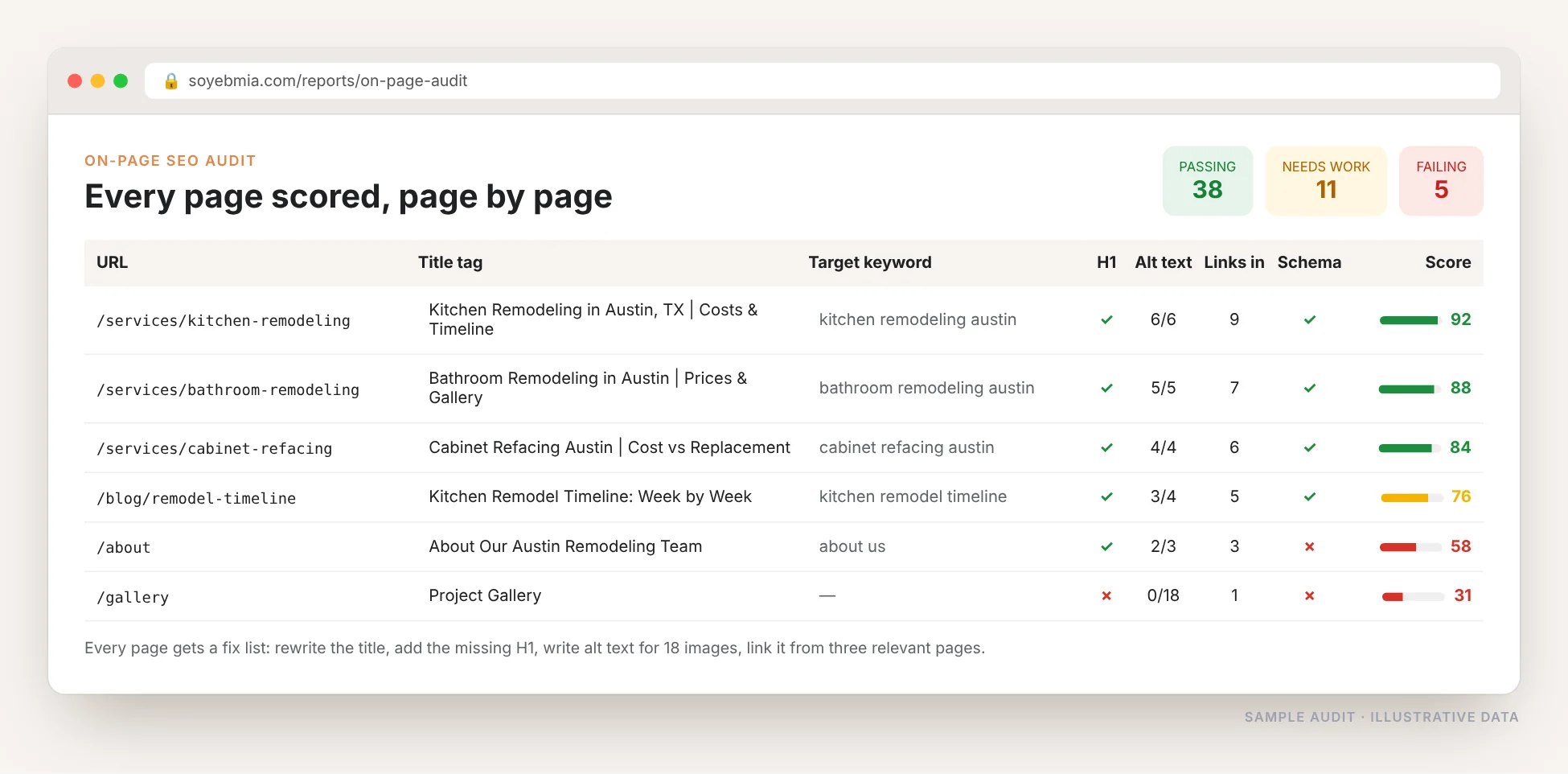
Every Page Scored, Then Fixed
I start by auditing every page on the site: what keyword it targets, whether its title and H1 match, how many images lack alt text, how many internal links point at it and whether it has schema.
That gives a score per page and a fix list per page, so you can see exactly what was wrong and exactly what changed.
- One target keyword per page, no two pages competing
- A fix list you can check line by line
- Changes made on your CMS, not handed over as a PDF
- Rankings and clicks tracked after the work
On-Page SEO Services I Offer
On-Page SEO Audit
Every page scored on title, headings, content, URL, images, links and schema, with a prioritized fix list.
Title & Meta Optimization
Titles and descriptions rewritten for every important page, built around the keyword and the click.
Content & Heading Structure
Pages restructured so each section answers a real question, with the answer in the first lines.
Keyword Mapping
One keyword per page across the whole site, so your own pages stop competing with each other.
Internal Linking & Images
Links planned between related pages, images compressed, renamed and given proper alt text.
Schema Markup
Service, Product, FAQ, Article, Review and Breadcrumb schema added and validated.
My On-Page SEO Process
Audit
Every page crawled and scored, with duplicate and cannibalizing pages flagged.
Map
One target keyword assigned to each page, based on real search data.
Optimize
Titles, headings, content, URLs, images, links and schema fixed directly in your CMS.
Track
Rankings, clicks and CTR per page reported after the changes.
Who This Is For
- Sites that get impressions in Search Console but very few clicks
- Online stores with hundreds of product pages sharing one template
- Businesses whose pages rank on page two and never move up
- Anyone who published a lot of content without planning keywords
- Site owners who paid for links and saw nothing happen
- New websites that want to launch with every page done right
On-Page SEO Questions, Answered
What is on-page SEO?
On-page SEO is everything on the page itself that affects rankings: the title tag, meta description, headings, content, URL, images and alt text, internal links and schema markup. Off-page SEO, by contrast, is what happens elsewhere, mainly links and mentions from other websites.
Why is on-page SEO important?
It is the part of SEO you fully control, it is the cheapest to fix, and nothing else works without it. Google has to understand a page before it can rank it, and the title and description decide whether anyone clicks. Links pointed at a poorly structured page mostly go to waste.
Does on-page SEO work on Shopify, Wix and Squarespace?
Yes. Every platform has its own SEO panel with page titles, descriptions and URL settings. Some hide the settings deeper or limit what you can change, but the core work is possible on all of them, and I know the workarounds for each one’s limits.
How many keywords should one page target?
One main keyword per page, plus the close variations people naturally use. Targeting the same keyword with several pages makes them compete with each other, which is why keyword mapping across the whole site matters more than optimizing pages one by one.
How long does it take to see results?
Google usually recrawls changed pages within days to a few weeks. Title and description changes can move clicks quickly. Ranking improvements from content and structure changes typically show over one to three months.
Do I still need backlinks?
For competitive keywords, yes. But on-page SEO comes first: it is cheaper, faster and makes every link you later earn more valuable, because the authority arrives at a page Google already understands.
Want Every Page Working?
Send me your website and I will audit your main pages, score each one and show you exactly what is holding them back.