
Pages That Load Fast, Feel Fast And Pass.
Core Web Vitals are the three numbers Google takes from real visitors on your site: how fast the page appears, how fast it responds, and how much it jumps around while loading. I find what is dragging them down, fix it, and get every URL into the green in Search Console.
What Google Actually Measures
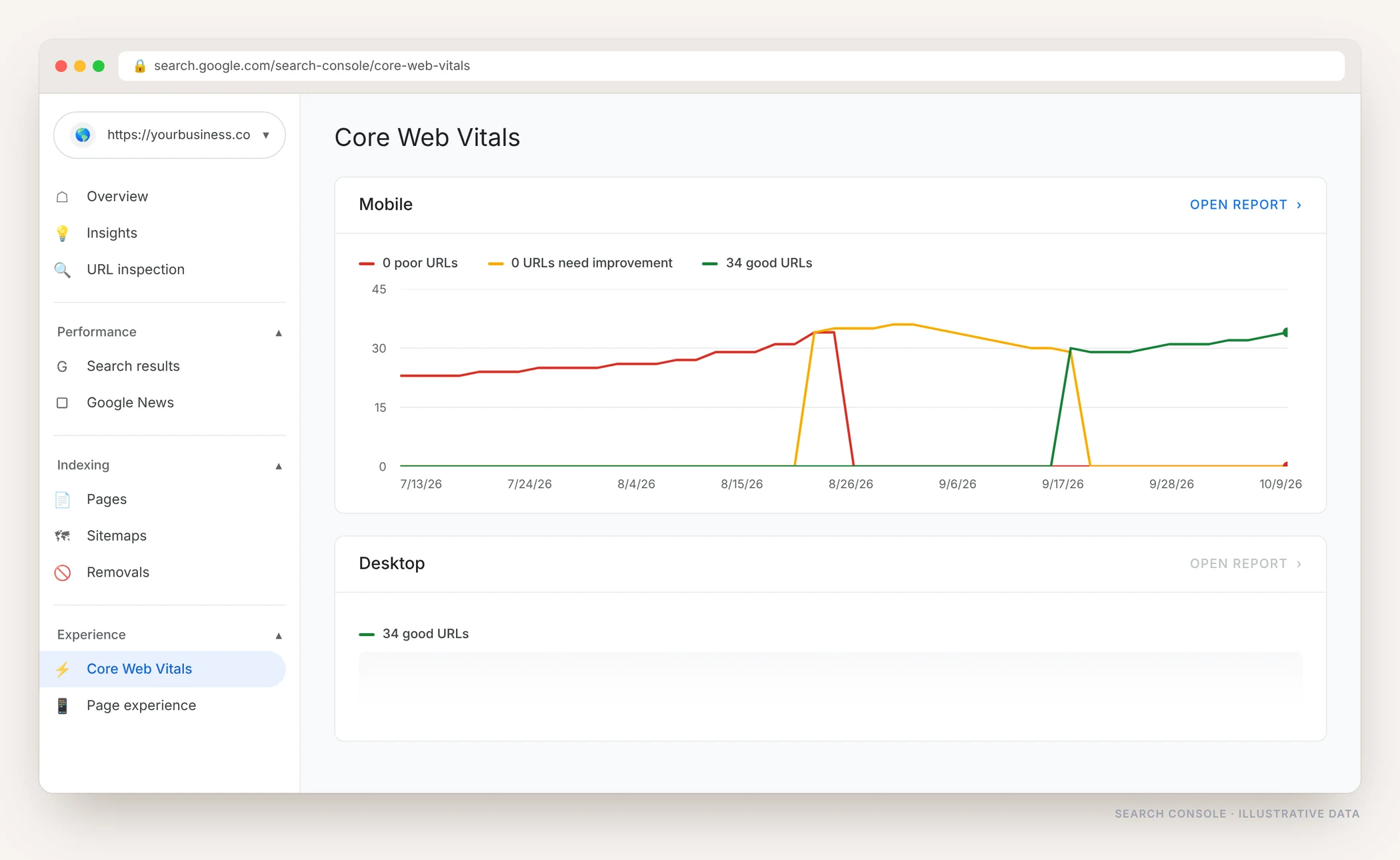
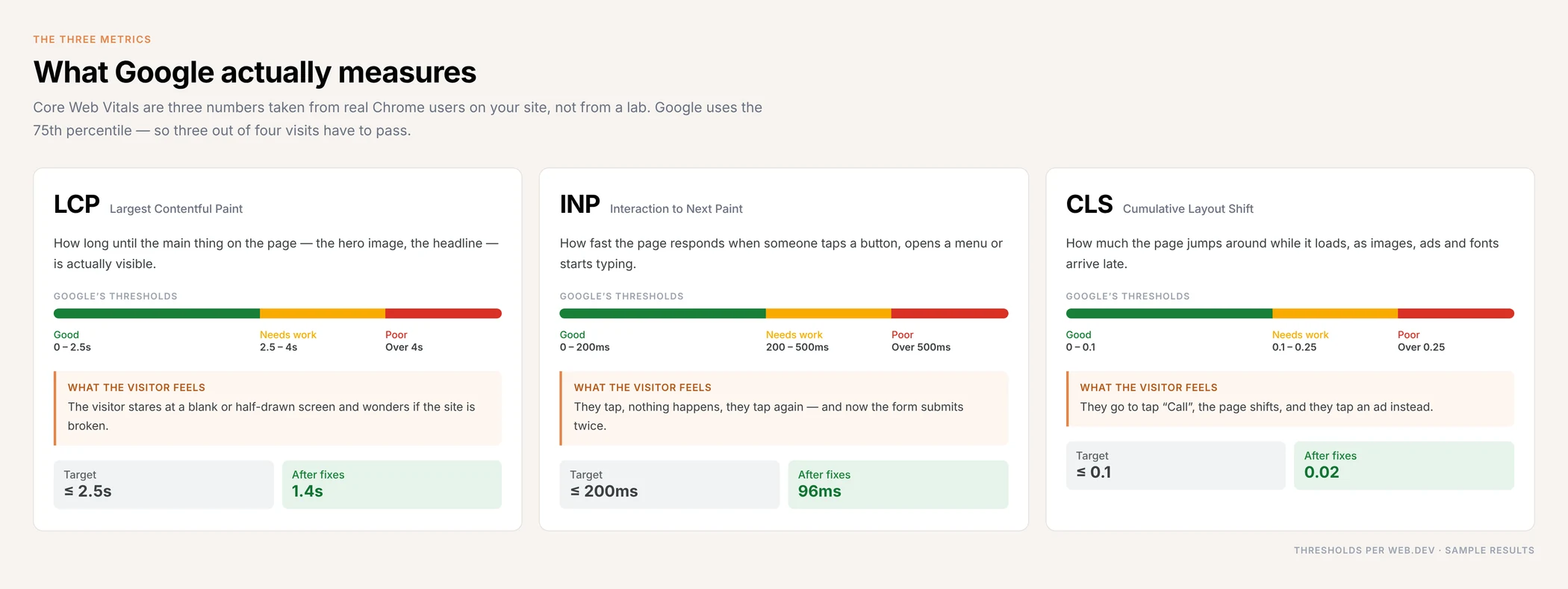
These numbers do not come from a speed test you run once. They come from real Chrome users visiting your pages, collected over 28 days. Google looks at the 75th percentile, so three out of every four visits have to pass before the page counts as good.
Why Core Web Vitals Are Worth Fixing
Speed is not a vanity metric. It decides whether the visit happens at all, and it quietly affects every other thing you are paying for.
People leave before the page loads
Most mobile visitors abandon a page that takes more than three seconds. Your best content never gets read, and your ad spend pays for a bounce.
It is a confirmed ranking signal
Page experience will not beat better content on its own, but when two pages are close, the faster one wins. On competitive terms that is the whole gap.
Slow pages convert worse
Every extra second between tap and content costs enquiries. The form is the same form; fewer people reach it.
Layout shift costs you taps
When the page jumps as it loads, people tap the wrong thing. Sometimes that is an ad, sometimes it is the back button.
Crawling gets cheaper
A fast server means Googlebot gets through more of your site in the same budget, which matters once you have hundreds of URLs.
Your ads get cheaper too
Landing page experience feeds into Google Ads Quality Score. The same fixes that help SEO lower what you pay per click.
Lab Scores Are Not The Same As Passing
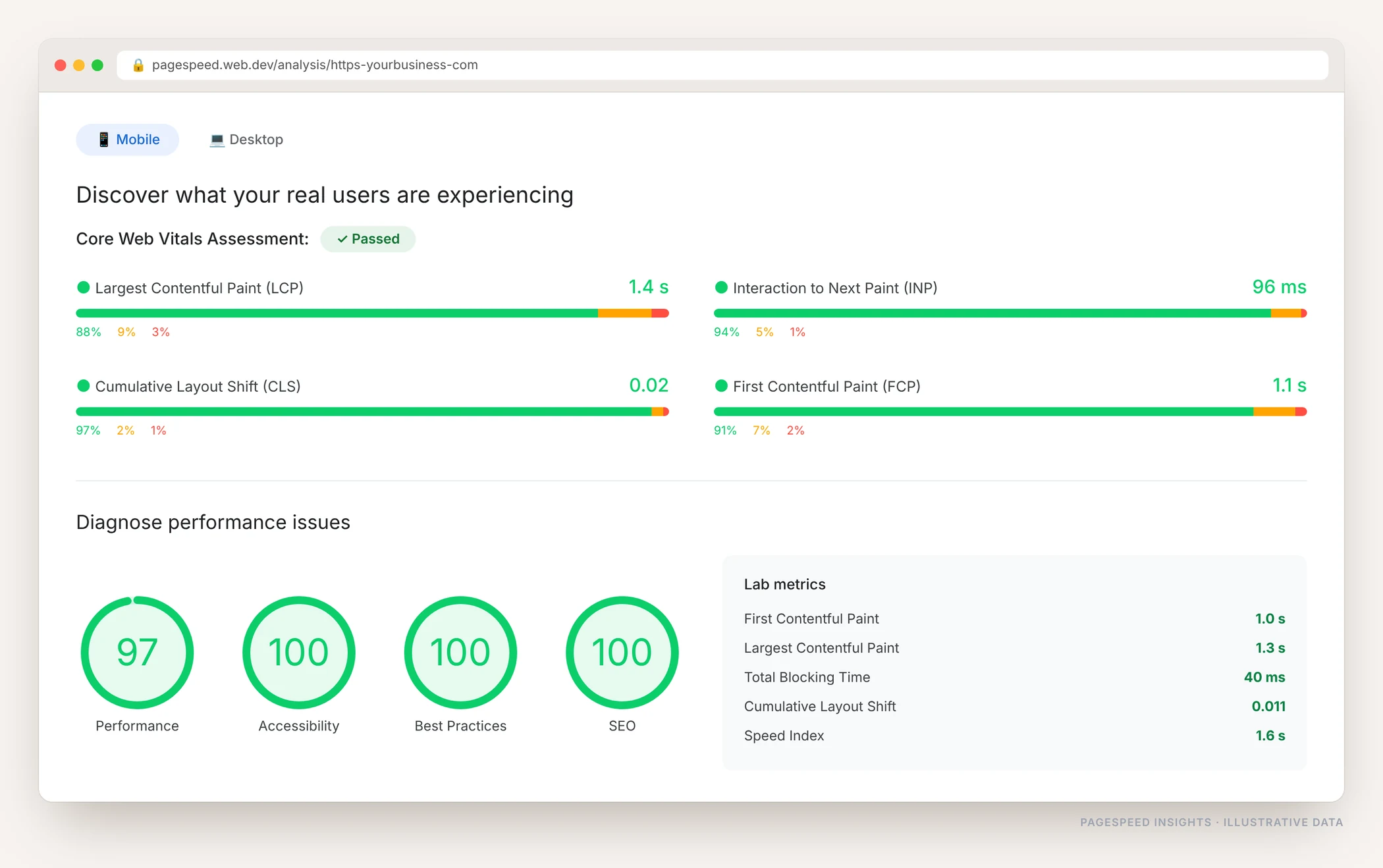
A 100 in a speed test proves nothing on its own. That is a lab run on a simulated phone. What Google uses is field data — the Chrome User Experience Report, collected from people actually visiting your site on their own phones and connections. I work against the field data, and use the lab tools only to find the cause.
What Usually Breaks Core Web Vitals
It is almost never one thing. On most sites it is the same handful of problems stacked on top of each other, and each one is fixable.
- Huge uncompressed images loaded at full size on mobile
- Render-blocking CSS and JavaScript sitting in the head
- A slow server, so nothing can start until 1.5 seconds in
- Web fonts that block text from appearing
- Page builders loading every widget on every page
- Plugins that each add their own stylesheet and script
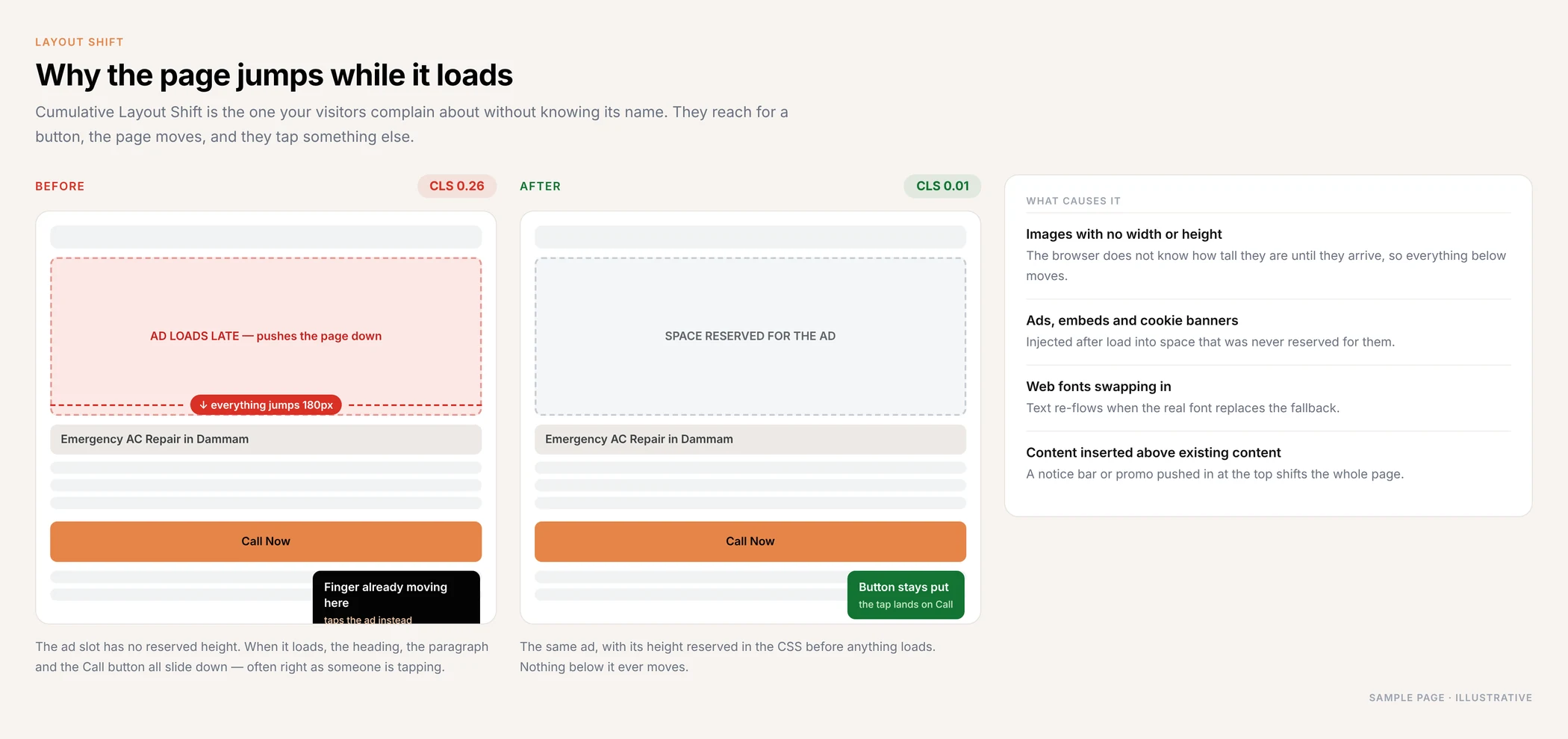
- Images with no width or height, so content jumps when they land
- Ads, cookie banners and chat widgets injected after load
- Sliders and video embeds above the fold
- Third-party scripts tying up the main thread
- No caching, so every visit rebuilds the page from scratch
- Everything loading at once, with nothing deferred
The Problem Visitors Complain About Most
CLS is the one people notice without knowing its name. They reach for a button, the page moves, and they tap something else. It is also one of the easiest to fix — most of it is just reserving space before the content arrives.
What I Actually Change
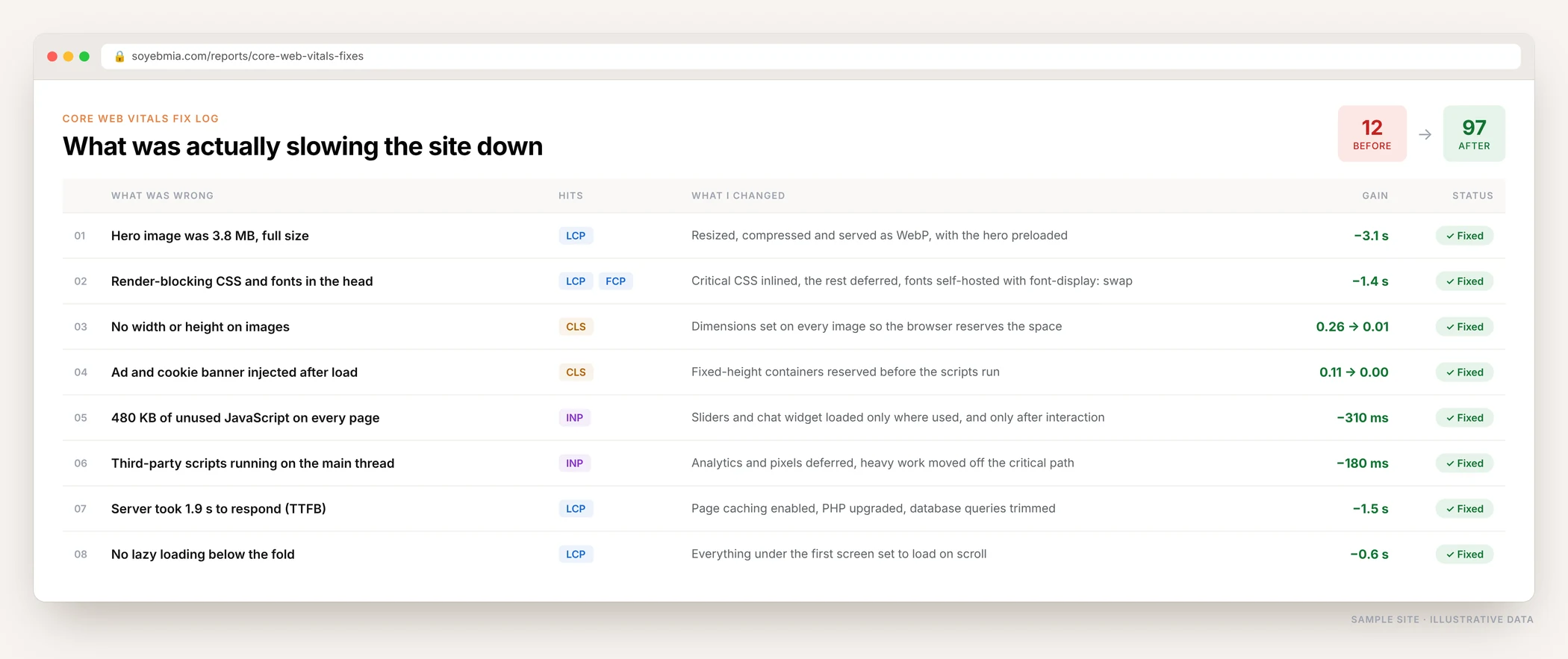
Every fix is logged against the metric it affects and the time it saved, so you can see exactly where the improvement came from.
What Is Included
Full Core Web Vitals audit
Field data and lab data for every page group, mobile and desktop, with the failing URLs listed rather than summarised.
Image and media optimisation
Resized, compressed, converted to WebP, lazy loaded below the fold, with the LCP image preloaded.
CSS and JavaScript cleanup
Critical CSS inlined, the rest deferred, unused code removed, third-party scripts moved off the critical path.
Layout shift fixes
Dimensions on every image, reserved space for ads and embeds, fonts that swap without reflowing the page.
Server and caching setup
Page caching, compression, a CDN where it helps, and the hosting-level problems that no plugin can fix.
Before and after report
Field data before, field data after, and Search Console showing the URLs moving into the good bucket.
My Core Web Vitals Process
Measure
Search Console, CrUX field data and Lighthouse on your real pages, not just the homepage.
Diagnose
Waterfall and trace analysis to find what is actually holding up the render, not what a plugin guesses.
Fix
Images, code, fonts, server and layout, applied in the order that gives the biggest gain first.
Verify
Re-test, validate in Search Console, and watch the field data for the 28 days it takes to update.
Who This Is For
- Sites showing poor or needs-improvement URLs in Search Console
- WordPress sites slowed down by a page builder and too many plugins
- Online stores losing checkouts on mobile
- Businesses paying for ads that land on a slow page
- Anyone whose rankings slipped after a page experience update
- Developers who need the diagnosis before they start rewriting
Core Web Vitals Questions, Answered
What are Core Web Vitals?
Three measurements Google takes from real visitors to your site. LCP is how long until the main content appears, INP is how quickly the page responds when someone taps or types, and CLS is how much the page moves around while it loads. A page passes when all three are in the good range for at least 75 percent of visits.
What counts as a good score?
LCP under 2.5 seconds, INP under 200 milliseconds and CLS under 0.1. Between 2.5 and 4 seconds, 200 and 500 milliseconds, or 0.1 and 0.25 is needs improvement. Anything above that is poor.
Do Core Web Vitals really affect rankings?
Yes, but as a tiebreaker rather than a replacement for good content. Google has said page experience helps when other signals are comparable. In practice that is most competitive searches, where the top results all have decent content.
My PageSpeed score is 100, so why is Search Console still showing problems?
Because they measure different things. The score is a lab test on a simulated device. Search Console uses field data from real visitors on real phones and real connections, averaged over 28 days. Passing in the lab and failing in the field is common.
How long before I see the improvement?
The fixes are live immediately and you can verify them the same day in the lab tools. Search Console and field data use a rolling 28-day window, so the report usually takes three to four weeks to fully reflect the change.
Will a caching plugin fix this on its own?
Partly. Caching helps server response time, which is one input to LCP. It does nothing for oversized images, layout shift, render-blocking code or heavy JavaScript. Most sites need the actual causes fixed, not another plugin added on top.
Do you work on WordPress, Shopify and custom sites?
Yes. WordPress gives the most room to work with, Shopify needs theme and app-level changes, and custom builds usually need developer coordination. The diagnosis is the same in all three cases.
Find Out Why Your Pages Are Slow
Send me your website. I will check your Core Web Vitals field data, tell you exactly what is failing and what it would take to fix it — before you commit to anything.