
Make Your Site Load In Under Two Seconds.
A slow site loses the visit before anyone reads a word. I find exactly what is holding your pages up — the server, the images, the scripts, the plugins — and fix the causes, not the symptoms. You get the before and after, measured on a real mobile connection.
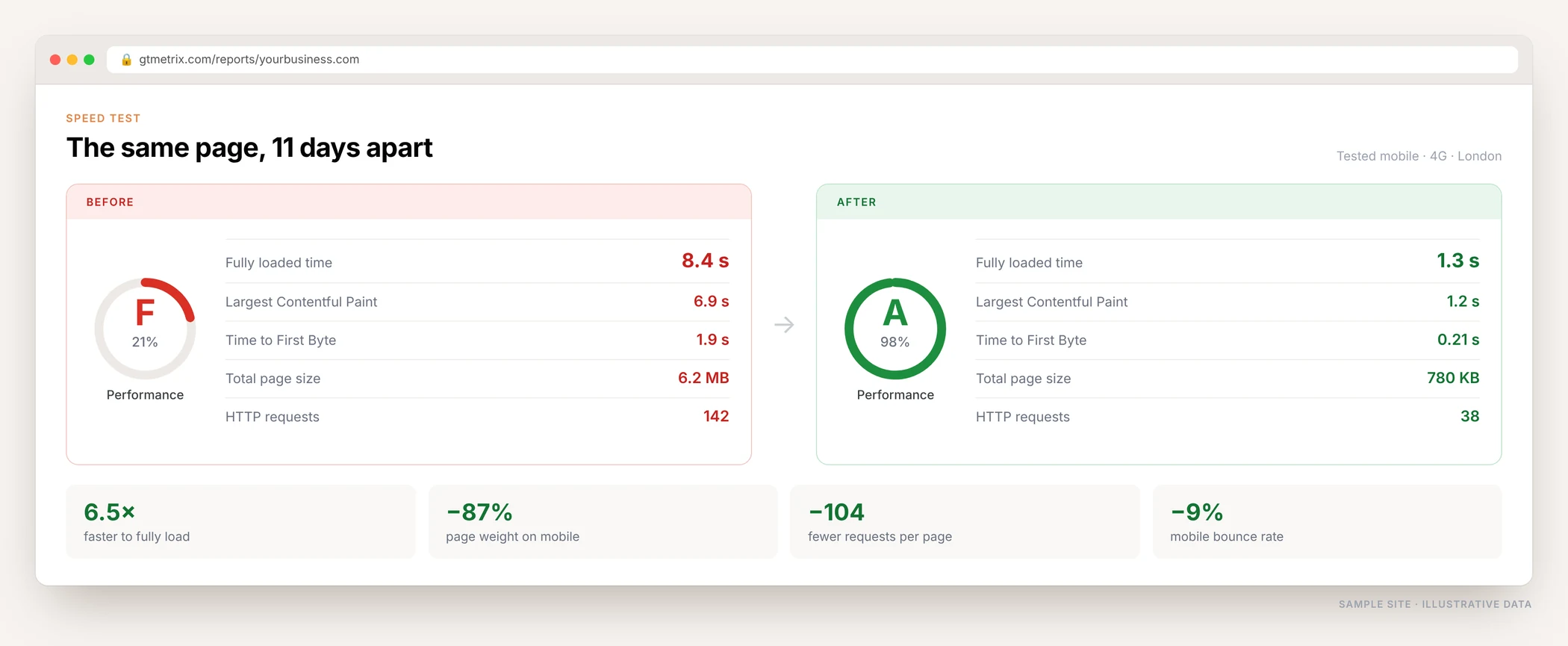
What Slow Pages Are Costing You
Speed is not a technical nicety. It is the first thing every visitor experiences, and it quietly decides how much of everything else works.
Over half leave before it loads
Most mobile visitors abandon a page that takes more than three seconds. They never see your offer, your reviews or your phone number.
Every second costs conversions
The form, the product and the price are all the same. Fewer people simply reach them. Slow pages quietly shrink every campaign you run.
Your ads pay the price twice
You pay for the click, then lose the visitor to a loading spinner. Landing page experience also feeds into Quality Score, so the click costs more.
Google notices
Speed feeds into page experience signals. It will not outrank better content, but between two close pages the faster one wins.
Googlebot crawls less of your site
A slow server means fewer pages crawled per visit. On a large site, new and updated pages sit waiting to be seen.
It gets worse on its own
Every new plugin, tracking pixel and image adds weight. Without a cleanup, a site that was fine two years ago is now unusable on 4G.
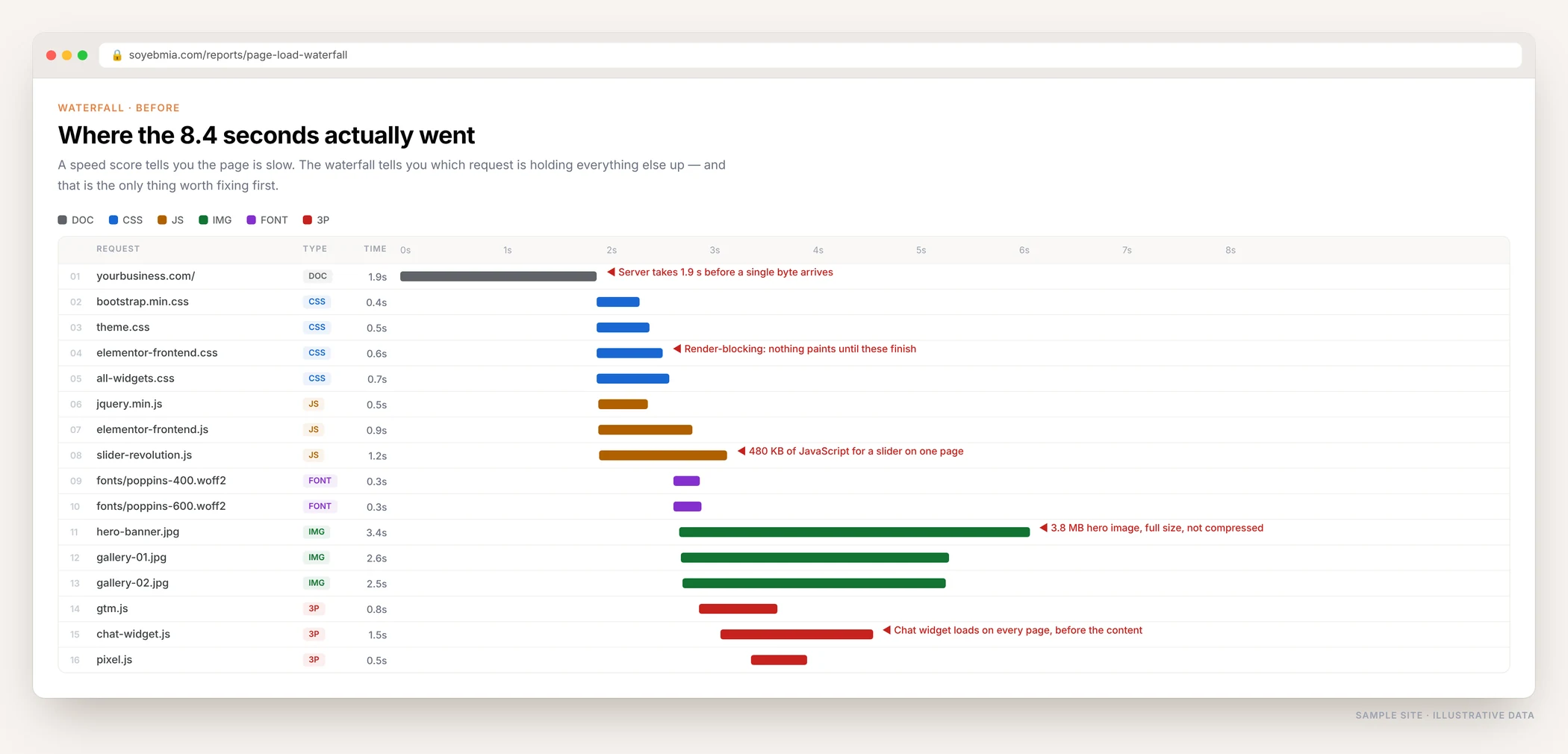
Where The Seconds Actually Go
A score out of 100 tells you the page is slow. It does not tell you why. The waterfall does — it shows every file the browser has to fetch, in what order, and which one is making everything else wait. That is where the work starts.
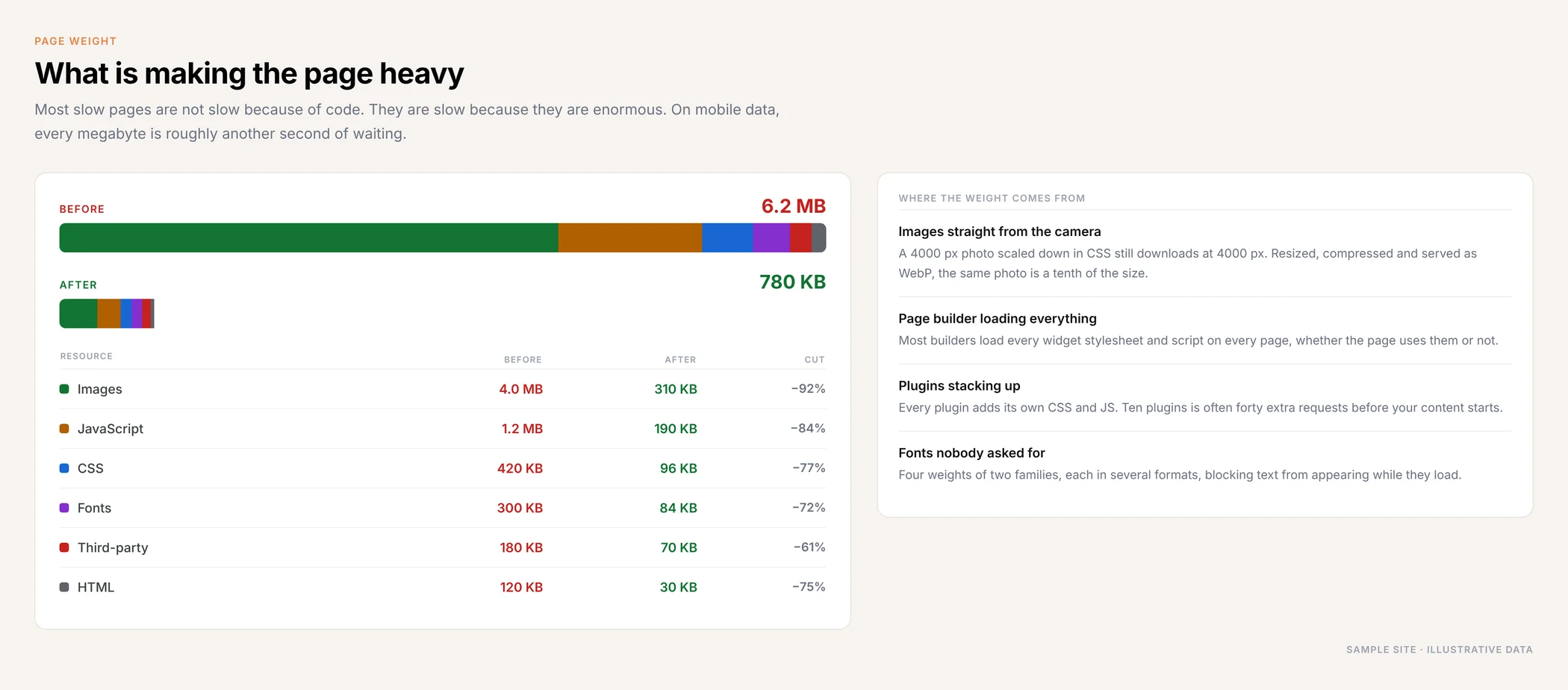
Most Slow Sites Are Simply Too Heavy
It is rarely clever code that is needed. It is usually a 4 MB photo being used as a background, a page builder loading every widget it owns, and ten plugins each adding their own files. Cutting the weight is the single biggest win on most sites.
What Usually Makes A Site Slow
It is almost always several of these at once, each adding a second or two on top of the last.
- Cheap shared hosting taking two seconds to respond
- No caching, so every visit rebuilds the page from the database
- An outdated PHP version running everything slower
- A bloated database full of revisions, spam and leftover plugin data
- Photos uploaded straight from a phone or camera
- Images scaled down in CSS instead of being resized properly
- A page builder loading every widget on every page
- Twenty plugins, each with its own stylesheet and script
- Sliders and video embeds at the top of the page
- Chat widgets and tracking pixels loading before the content
- Fonts that block text from appearing
- No CDN, so visitors far away wait longer than everyone else
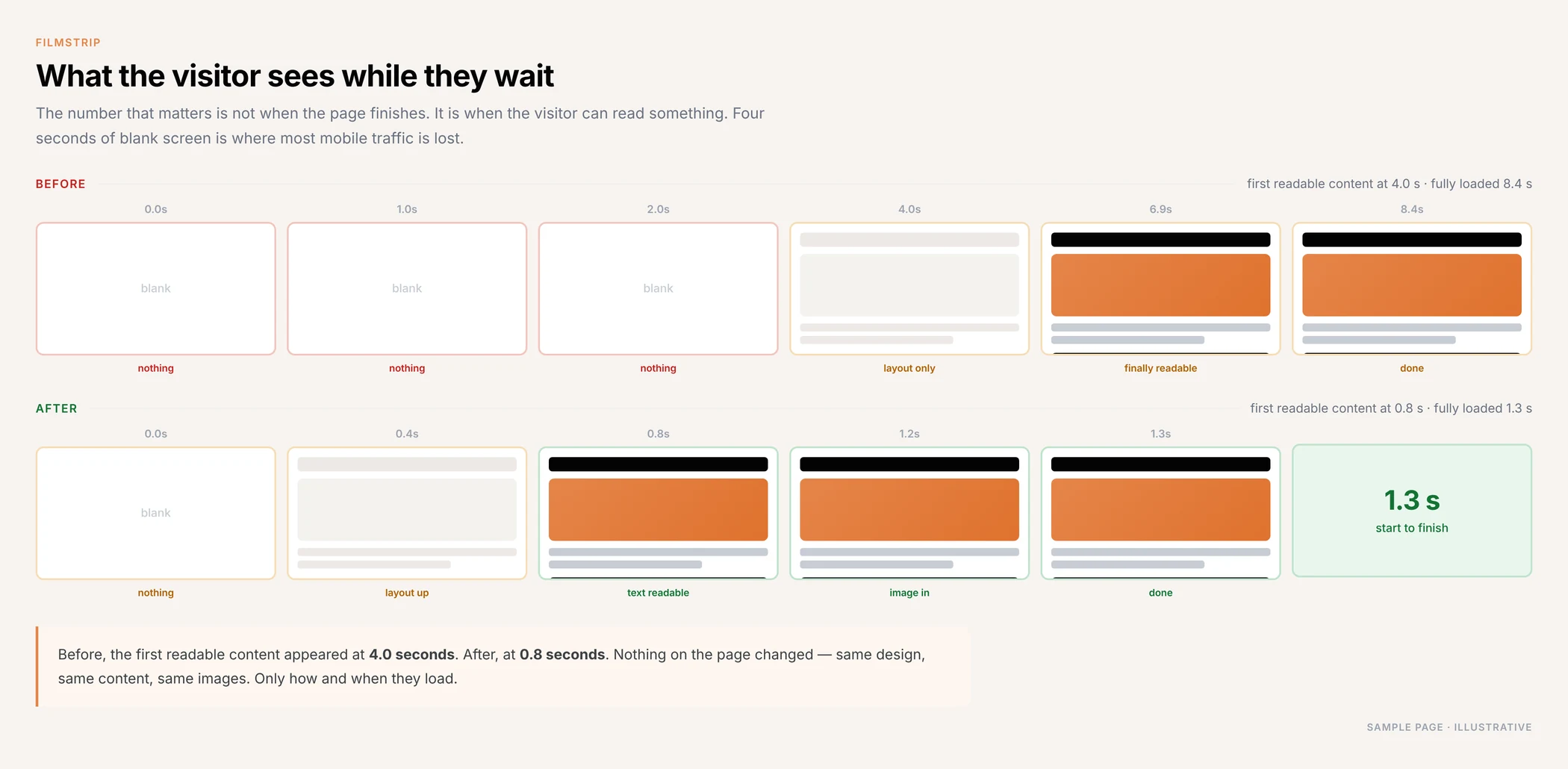
What The Visitor Actually Experiences
The number worth caring about is not when the page finishes loading. It is when someone can read something. That is the moment they decide whether to stay.
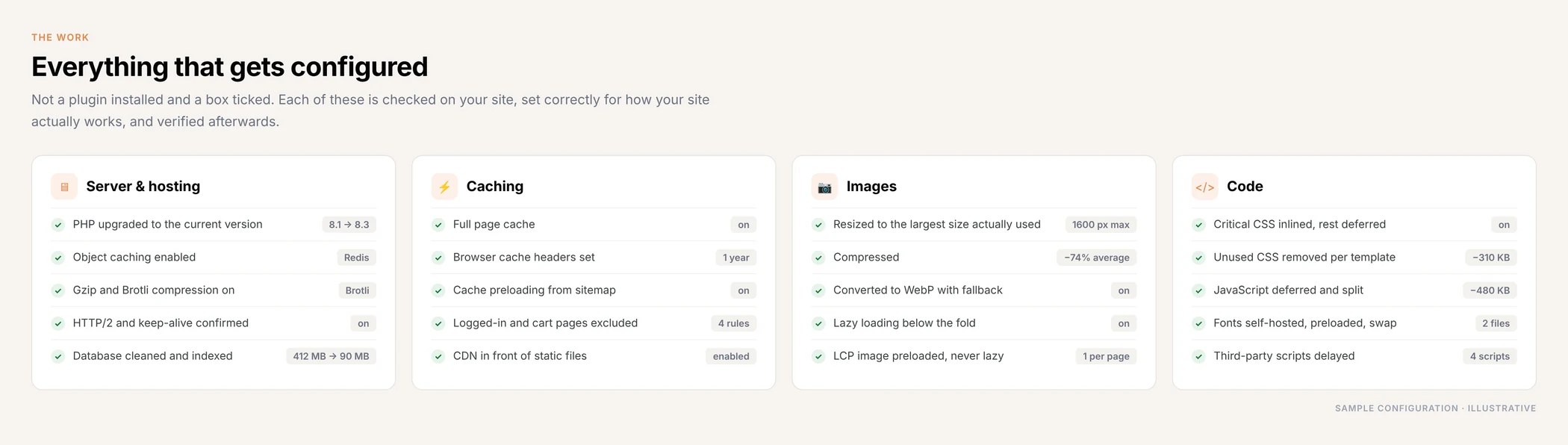
What I Actually Configure
Not a plugin installed and a box ticked. Every setting is checked against how your site really works, applied, and verified afterwards.
What Is Included
Full speed diagnosis
Waterfall and trace analysis on your real pages — home, service, product, blog — on mobile and desktop, not just the homepage.
Server and hosting fixes
PHP version, server response time, compression, database cleanup, and an honest answer on whether your host is the problem.
Caching done properly
Page cache, browser cache, object cache and preloading, with carts, checkouts and logged-in pages correctly excluded.
Image optimisation
Every image resized, compressed and served as WebP, lazy loaded below the fold, with the main image preloaded.
Code and plugin cleanup
Unused CSS and JavaScript removed per template, scripts deferred, third-party tags delayed, dead plugins removed.
Before and after report
Load time, page weight, request count and Core Web Vitals, measured the same way before and after so the numbers mean something.
My Page Speed Process
Test
Real pages, real mobile connection, from the locations your customers are actually in.
Diagnose
Waterfall, server timing and page weight, to find the two or three things causing most of the delay.
Fix
Biggest win first, with a backup before anything changes and nothing broken on the way.
Re-test
Same pages, same conditions, so the before and after are a fair comparison, not a lucky run.
Who This Is For
- WordPress sites that got slow as plugins and content piled up
- Elementor, Divi and WPBakery builds loading far more than they use
- WooCommerce and Shopify stores losing mobile checkouts
- Businesses running ads to a landing page that takes five seconds
- Sites with good content that nobody waits around to read
- Anyone told “just install a caching plugin” and still stuck at 40
Page Speed Questions, Answered
How fast should my site be?
Aim for the main content appearing in under 2.5 seconds on a mobile connection, and the page fully usable in under 3. Under 2 seconds is where it stops feeling like waiting at all. The exact number matters less than whether the visitor sees something useful quickly.
Will a caching plugin fix my speed problem?
It helps with one part — how long the server takes to respond. It does nothing about oversized images, a page builder loading every widget, render-blocking code or third-party scripts. Most sites need the actual causes fixed, not another plugin added on top.
Do I need to change hosting?
Sometimes. If your server is taking more than a second to respond and there is nothing left to cache, no amount of optimisation on the site will fix that. I will tell you honestly whether hosting is the bottleneck before you spend money either way.
Will anything break?
I take a full backup first and test every change on your real pages — forms, carts, sliders, booking widgets. Aggressive optimisation can break things, which is why each setting is applied deliberately rather than everything switched on at once.
Will my site look different afterwards?
No. The design, the content and the images stay exactly the same. What changes is how and when they load.
How long does it take?
Usually two to five days for a normal business site. Large stores with thousands of products and heavy themes take longer, and anything needing a hosting move adds a few days on top.
Is this the same as Core Web Vitals?
They overlap but are not the same. Page speed is how fast the site loads overall. Core Web Vitals are three specific measurements Google takes from real visitors. Fixing speed usually fixes the vitals too, and I check both.
Find Out Why Your Site Is Slow
Send me your website. I will test it on a real mobile connection, tell you what is actually causing the delay, and what it would take to fix — before you commit to anything.